Note
Go to the end to download the full example code.
2.2 Reproducing kernels and transformation maps
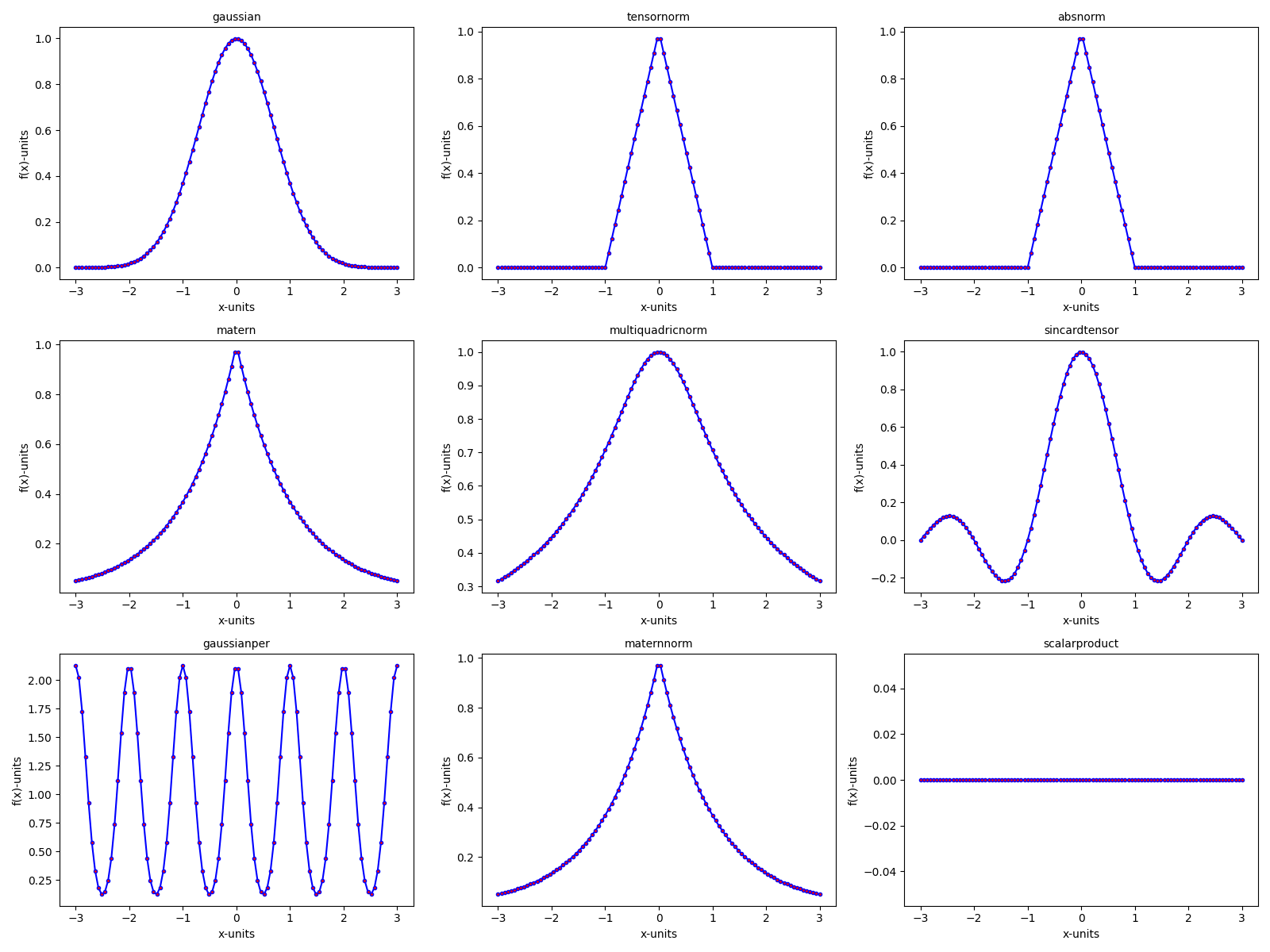
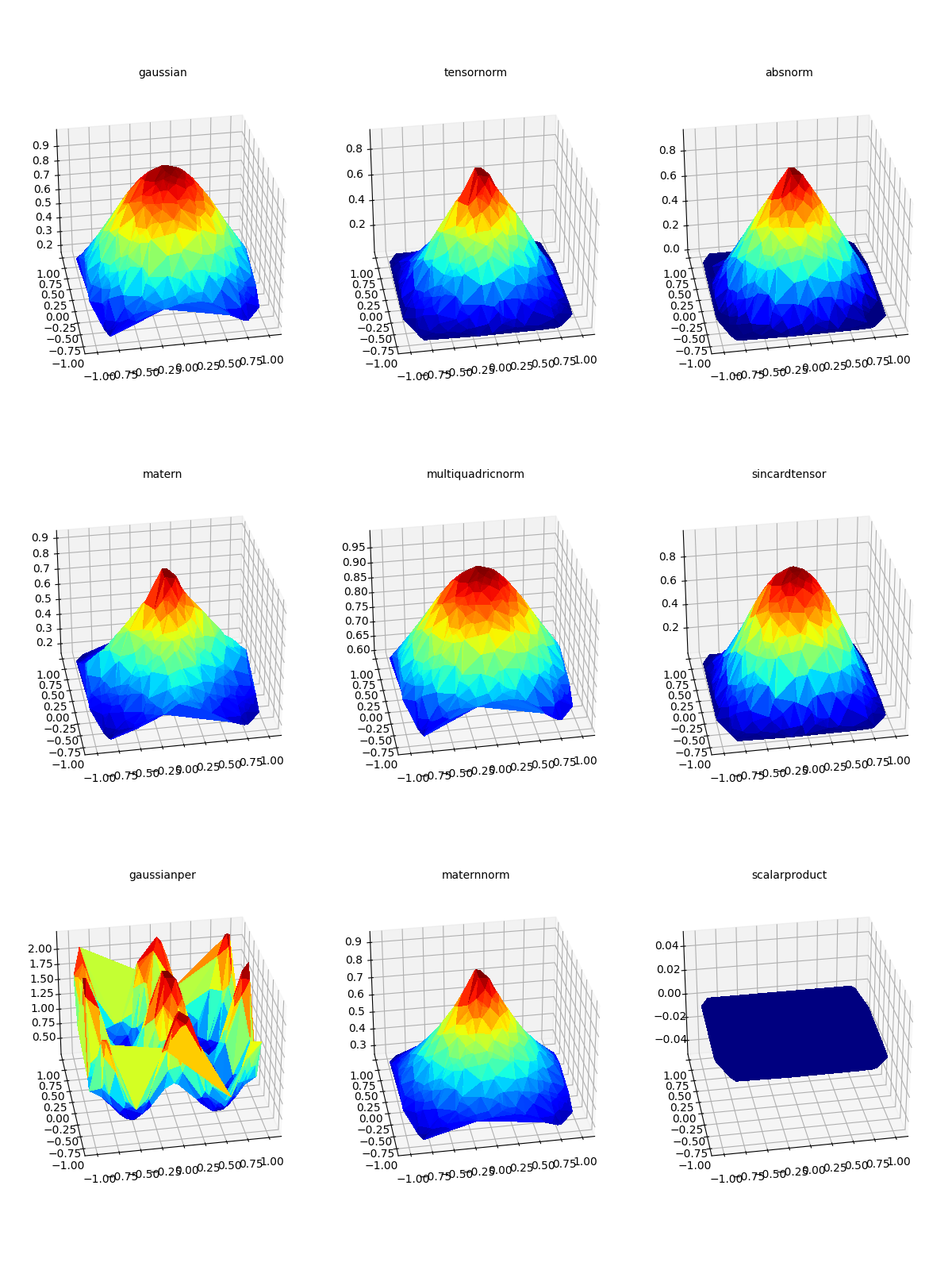
In this experiment, we plot in 2D and 3D various kernels available in CodPy.
# Importing necessary modules
import os
import sys

curr_f = os.path.join(os.getcwd(), "codpy-book", "utils")
sys.path.insert(0, curr_f)


import matplotlib.pyplot as plt
import numpy as np

# import CodPy's core module and Kernel class
from codpy import core
from codpy.kernel import Kernel

# from codpy.plotting import plot1D
# Lets import multi_plot function from codpy utils
from codpy.plot_utils import multi_plot, plot1D


def kernel_fun(x=None, kernel_name=None, D=1):
    if x is None:
        x = np.linspace(-3, 3, num=100)
    y = np.zeros([1, D])
    kernel = Kernel(
        set_kernel=core.kernel_setter(kernel_name, None),
        x=x,
        order=1,
    )
    out = kernel.knm(x, y)
    return out


def kernel_funs_plot():
    kernel_list = [
        "gaussian",
        "tensornorm",
        "absnorm",
        "matern",
        "multiquadricnorm",
        # "multiquadrictensor",
        "sincardtensor",
        # "sincardsquaretensor",
        # "dotproduct",
        "gaussianper",
        "maternnorm",
        "scalarproduct",
    ]

    # Prepare the results for plotting each kernel
    results = [
        (np.linspace(-3, 3, num=100), kernel_fun(kernel_name=kernel_name).flatten())
        for kernel_name in kernel_list
    ]

    # Legends for each kernel in the plot
    legends = kernel_list

    # Plot all kernels using multi_plot in a 4x4 grid
    multi_plot(
        results,
        plot1D,
        f_names=legends,
        mp_nrows=3,
        mp_ncols=3,
        mp_figsize=(16, 12),
    )


# Run the experiment with CodPy and SciPy models
# core.KerInterface.set_verbose()
kernel_funs_plot()
plt.show()
Kernel Gram matrix Positive definite kernels and kernel matrices. A kernel, denoted by \(k: \mathbb{R}^D \times \mathbb{R}^D \to \mathbb{R}\), is a symmetric real-valued function, that is, satisfying \(k(x, y)=k(y, x)\). Given two collections of points in \(\mathbb{R}^D\), namely \(X = (x^1, \cdots, x^{N_x})\) and \(Y = (y^1, \cdots, y^{N_y})\), we define the associated kernel matrix \(K(X,Y) = \big(k(x^n,y^m) \big) \in \mathbb{R}^{N_x, N_y}\) by
import pandas as pd

x = np.random.randn(10, 1)
kernel = Kernel(
    set_kernel=core.kernel_setter("gaussian", None),
    x=x,
    order=1,
)

# Kernel Gram matrix
print(pd.DataFrame(kernel.knm(x, x)))
          0         1         2         3         4         5         6         7         8         9
0  1.000000  0.039997  0.485097  0.001687  0.969665  0.163022  0.626316  0.810604  0.881845  0.746901
1  0.039997  1.000000  0.000917  0.584600  0.020660  0.818636  0.291607  0.167854  0.009882  0.207555
2  0.485097  0.000917  1.000000  0.000011  0.634033  0.008000  0.094904  0.180349  0.781960  0.144546
3  0.001687  0.584600  0.000011  1.000000  0.000674  0.248462  0.033511  0.013855  0.000248  0.019319
4  0.969665  0.020660  0.634033  0.000674  1.000000  0.098526  0.477680  0.669228  0.968437  0.599145
5  0.163022  0.818636  0.008000  0.248462  0.098526  1.000000  0.644512  0.454047  0.055313  0.521736
6  0.626316  0.291607  0.094904  0.033511  0.477680  0.644512  1.000000  0.950292  0.340020  0.979527
7  0.810604  0.167854  0.180349  0.013855  0.669228  0.454047  0.950292  1.000000  0.516495  0.993303
8  0.881845  0.009882  0.781960  0.000248  0.968437  0.055313  0.340020  0.516495  1.000000  0.449026
9  0.746901  0.207555  0.144546  0.019319  0.599145  0.521736  0.979527  0.993303  0.449026  1.000000
MMD Matrix
MMD matrices provide a very useful tool in order to evaluate the accuracy of a computation. To any positive kernel \(k : \mathbb{R}^D, \mathbb{R}^D \mapsto \mathbb{R}\), we associate the discrepancy function \(d_k(x,y)\) defined (for \(x,y\in\mathbb{R}^D\)) by
print(pd.DataFrame(kernel.kernel_distance(x)))
          0         1         2         3         4         5         6         7         8         9
0  0.000000  1.920006  1.029805  1.996626  0.060669  1.673956  0.747368  0.378793  0.236310  0.506198
1  1.920006  0.000000  1.998166  0.830799  1.958679  0.362728  1.416785  1.664292  1.980237  1.584890
2  1.029805  1.998166  0.000000  1.999978  0.731933  1.983999  1.810192  1.639303  0.436080  1.710907
3  1.996626  0.830799  1.999978  0.000000  1.998652  1.503076  1.932979  1.972290  1.999504  1.961362
4  0.060669  1.958679  0.731933  1.998652  0.000000  1.802948  1.044641  0.661543  0.063126  0.801710
5  1.673956  0.362728  1.983999  1.503076  1.802948  0.000000  0.710976  1.091906  1.889375  0.956529
6  0.747368  1.416785  1.810192  1.932979  1.044641  0.710976  0.000000  0.099416  1.319960  0.040947
7  0.378793  1.664292  1.639303  1.972290  0.661543  1.091906  0.099416  0.000000  0.967011  0.013395
8  0.236310  1.980237  0.436080  1.999504  0.063126  1.889375  1.319960  0.967011  0.000000  1.101947
9  0.506198  1.584890  1.710907  1.961362  0.801710  0.956529  0.040947  0.013395  1.101947  0.000000
Kernels 2D visualisation
# Lets define helper function to plot 3D projection of the function
def plot_trisurf(xfx, ax, legend="", elev=90, azim=-100, **kwargs):
    from matplotlib import cm

    """
    Helper function to plot a 3D surface using a trisurf plot.

    Parameters:
    - xfx: A tuple containing the x-coordinates (2D points) and their
      corresponding function values.
    - ax: The matplotlib axis object for plotting.
    - legend: The legend/title for the plot.
    - elev, azim: Elevation and azimuth angles for the 3D view.
    - kwargs: Additional keyword arguments for further customization.

    """

    xp, fxp = xfx[0], xfx[1]
    x, fx = xp, fxp

    X, Y = x[:, 0], x[:, 1]
    Z = fx.flatten()
    ax.plot_trisurf(X, Y, Z, antialiased=False, cmap=cm.jet)
    ax.view_init(azim=azim, elev=elev)
    ax.title.set_text(legend)


def generate2Ddata(sizes_x):
    data_x = np.random.uniform(-1, 1, (sizes_x, 2))

    kernel_list = [
        "gaussian",
        "tensornorm",
        "absnorm",
        "matern",
        "multiquadricnorm",
        # "multiquadrictensor",
        "sincardtensor",
        # "sincardsquaretensor",
        # "dotproduct",
        "gaussianper",
        "maternnorm",
        "scalarproduct",
    ]

    # Prepare the results for plotting each kernel
    results = [
        (data_x, kernel_fun(data_x, kernel_name, D=2).flatten())
        for kernel_name in kernel_list
    ]

    # Legends for each kernel in the plot
    legends = kernel_list

    # Plot all kernels using multi_plot in a 4x4 grid
    multi_plot(
        results,
        plot_trisurf,
        f_names=legends,
        mp_nrows=3,
        mp_ncols=3,
        mp_figsize=(12, 16),
        elev=30,
        projection="3d",
    )


generate2Ddata(400)
plt.show()
pass
Total running time of the script: (0 minutes 12.053 seconds)